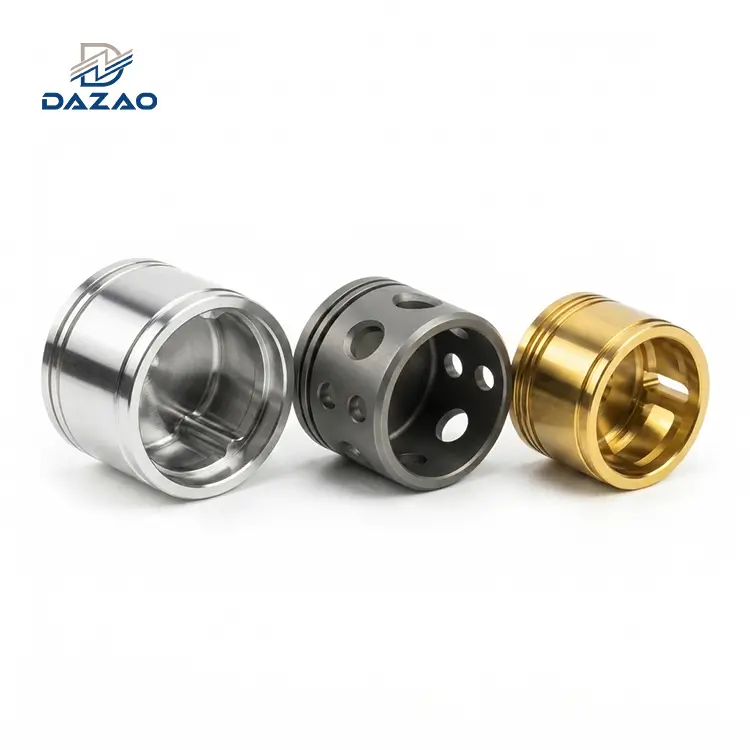

In precision manufacturing, a CMM inspection report is the definitive birth certificate of a machined component. For a procurement lead or project engineer at Xiamen Dazao Machinery, receiving a 5-page OQC (Outgoing Quality Control) report can be overwhelming. Most stakeholders skip directly to the final Pass or Fail checkmark. However, relying solely on the final status is a high-risk strategy that ignores the underlying mechanical health of the batch.
Understanding the logic behind Coordinate Measuring Machine (CMM) data allows you to predict assembly issues before parts hit the production line. This guide uses real data from a Dazao Machinery Middle Plate-1 inspection report to deconstruct technical parameters and identify hidden risks.

CMM Data Parameters Nominal Measured and Deviation Explained
A standard quality assurance documentation layout starts with linear dimensions. In the Dazao report for Middle Plate-1, the header displays critical tracking info: Part Name, Date (07.21.2025), and Item Count.
The Mathematics of Deviation
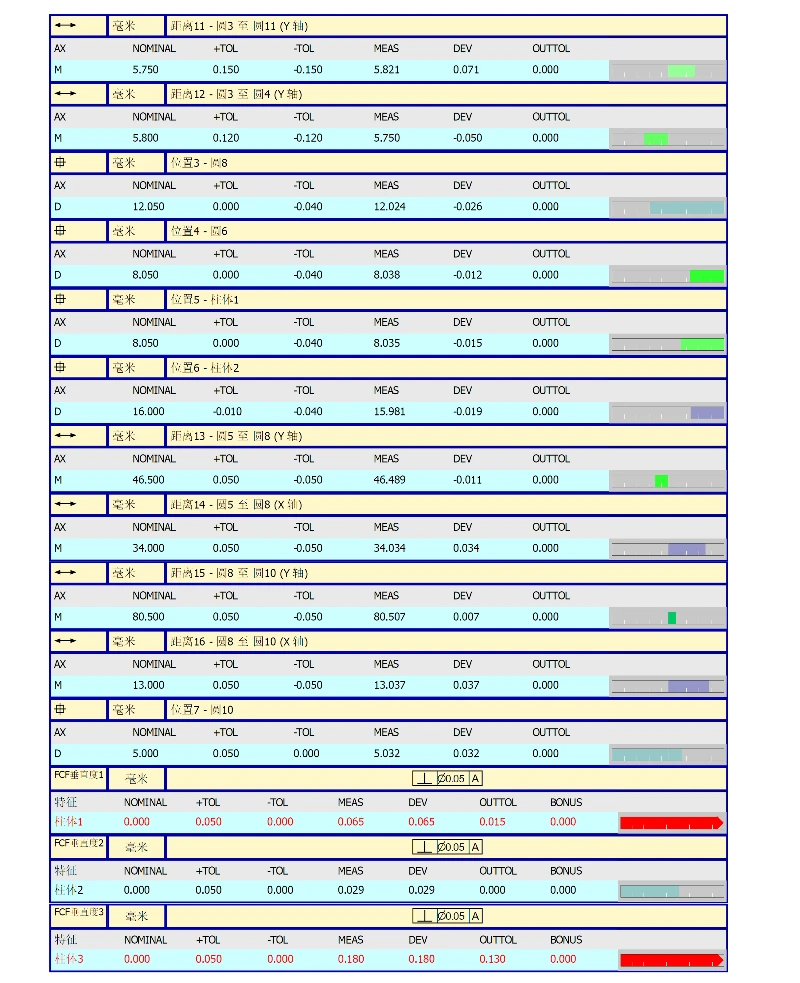
The report breaks down measurements into four core columns:
· NOMINAL: The theoretical CAD dimension defined by the engineering team.
· MEAS (Measurement): The actual value captured by the CMM probe.
· DEV (Deviation): The delta between MEAS and NOMINAL.
· TOL (Tolerance): The allowable range (+/-).
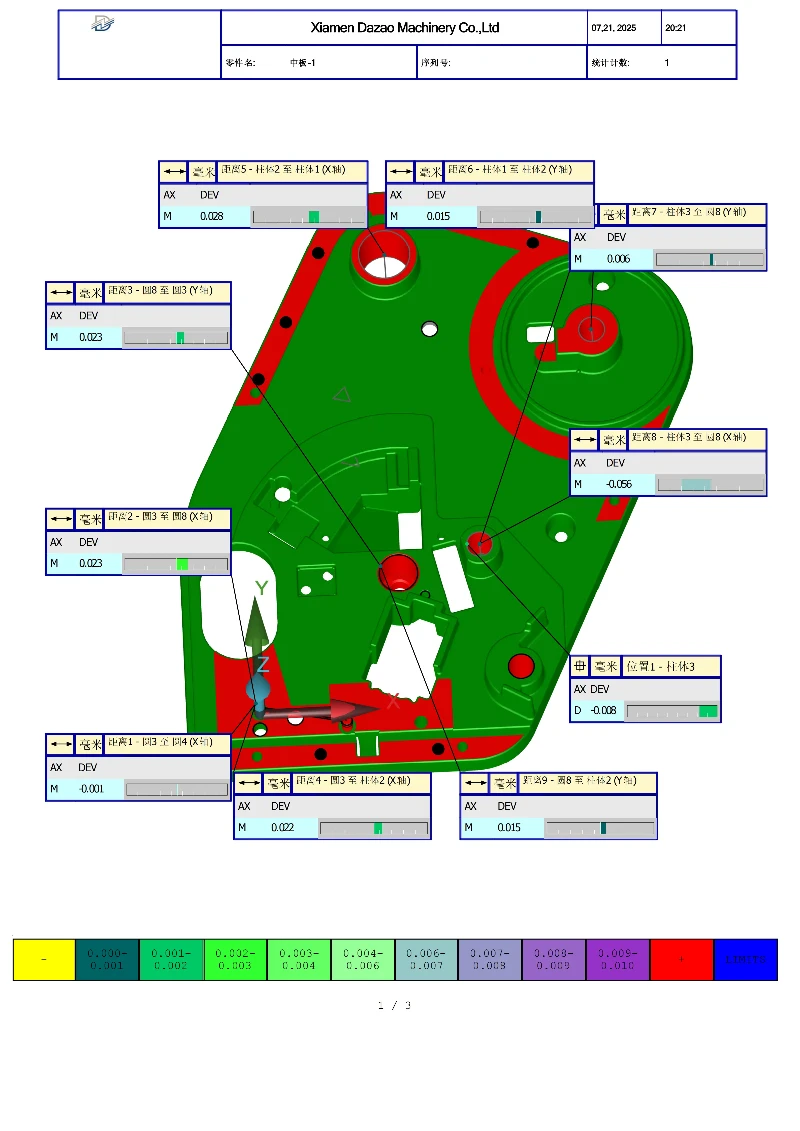
Case Study Analysis: Distance 8 (X-Axis)
Looking at Figure 1 of the Dazao report:
· Nominal: 25.800 mm
· MEAS: 25.744 mm
· DEV: -0.056 mm
· TOL: ±0.100 mm
While this part is In-Tolerance, the negative deviation (-0.056) indicates the part is slightly under-sized. For engineers, a negative deviation across multiple features often suggests tool wear or excessive material removal during the finishing pass. Consistent positive deviation might indicate a need for tool offset adjustment in the CNC machining process.
Geometric Dimensioning and Tolerancing Red Flags in OQC Reports
Linear dimensions are only half the story. Feature Control Frames (FCF) define the shape, orientation, and location of features. This is where most assembly failures originate.

Perpendicularity Errors and Root Cause Analysis
Observe FCF Perpendicularity 3 (Post 3) in the report:
· NOMINAL: 0.000
· TOL: 0.050 mm
· DEV: 0.180 mm
The CMM software generates a long red arrow in the status bar. A deviation of 0.180mm against a 0.050mm limit is a massive outlier. At Dazao, such spikes point to specific manufacturing issues:
1.Workholding Instability: The part moved during milling.
2.Tool Rigidity: End mill deflection at the top of the post.
3.Thermal Expansion: Material was not normalized between roughing and finishing.
Dazao presents raw data points transparently. Showing the Red status allows for a collaborative DFM discussion rather than hiding process instability.
3D Heat Maps for Predicting Part Assembly and Fit Issues
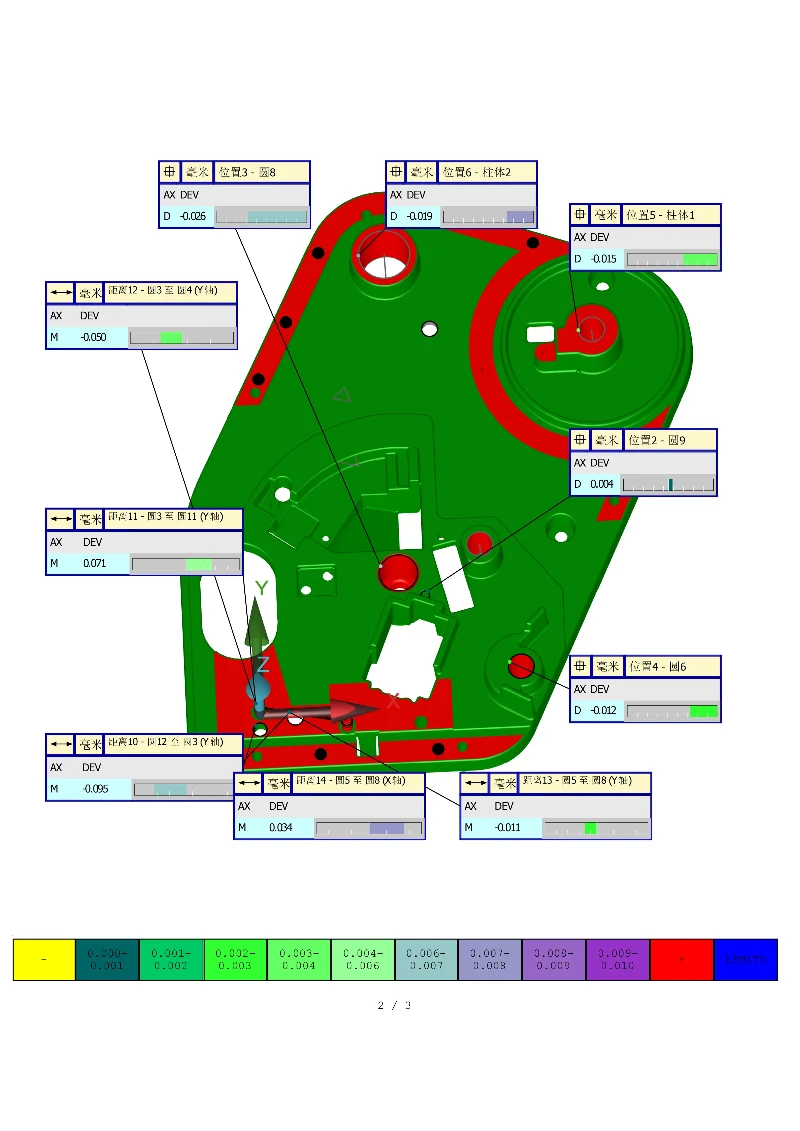
Modern CMM inspection reports include 3D graphical representations. These are spatial diagnostic tools.
Why Parts Pass Data but Fail Assembly?
A part might show 95% green in the data table but still fail to fit into its mating component. The 3D Heat Map solves this mystery.
The Edge Effect:
Notice red zones concentrated on the edges of the Middle Plate. If those red zones coincide with a mating surface, you will face interference during assembly. Even if the Average dimension is within tolerance, the Peak deviation at the edge can prevent a flush fit. Dazao QC teams use these color distributions to predict hard-to-fit zones and perform secondary light-passes to ensure functional compatibility.
Bonus Tolerance and Maximum Material Condition MMC Risks
Bonus Tolerance refers to Maximum Material Condition (MMC). If a hole is machined larger than its minimum limit, the extra space allows for more positional error without compromising function.
The Dazao Standard:
Bonus Tolerance should be used cautiously on press-fit components. If your design relies on a tight interference fit for a bearing, accepting a Bonus on a hole that is already too large will result in a loose bearing. We flag where Bonus Tolerance has been applied so your assembly team is prepared.
|
Measurement Parameter |
Symbol |
Impact on Assembly |
High-Risk Indicators |
|
Position |
⊕ |
Hole alignment for bolts |
Deviation > 50% of tolerance |
|
Perpendicularity |
⊥ |
Vertical post alignment |
Red progress bars in report |
|
Flatness |
▱ |
Surface sealing |
Wavy 3D heat map patterns |
|
Bonus Tolerance |
M |
Cost-saving flexibility |
Usage on critical press-fits |
Dazao Case Study Why Point Sampling Density Matters in QA
A significant milestone in Dazao's evolution involved a batch of robotics components that had Green CMM reports but were rejected. The CMM probe used low sampling density, taking only 4 points to measure a large bore. It missed subtle surface waviness caused by a worn spindle bearing.
Following that IATF16949-driven corrective action, Dazao updated inspection protocols. We now implement high-density point cloud sampling for critical bores. We provide a report with 200 points showing a slight deviation rather than a 4-point report that hides a manufacturing defect.
Strategic Advice for Procurement and QA Teams
When reviewing a read OQC report from Dazao or any Tier-1 supplier, follow these steps:
1.Analyze Trends: If dimensions trend toward the negative limit, tooling is likely near the end of its life.
2.Audit Red Zones: Ask for the Correction Plan. If a perpendicularity error exists, has the fixture been re-aligned?
3.Verify Accountability: Every Dazao report is time-stamped and verified by a human lead, ensuring a clear quality assurance documentation trail.
Dazao Machinery provides the data-driven confidence that parts will perform in the field. Transparency in reporting is the foundation of our partnerships in the aerospace and medical sectors.

FAQ: Questions About CMM and OQC Reports
01.What is the difference between a CMM report and a standard OQC report?
02.Why does my report show a Red status if the part functions?
03.Can Dazao provide 100% CMM inspection for every part?
04.How do I interpret the OUTTOL column?
05.Does temperature affect the CMM report data?
06.What should I do if I see a Bonus value in my report?